Planning
For a change that spans several steps, start in Plan Mode. Colossus can inspect the repository and save a plan you can review before any implementation starts. After you approve it, choose one execution run or a bounded Goal Mode loop for longer work.
The handoff is Draft → Review and refine → Approved → Direct or Goal Mode. The plan and its revisions are durable records; Goal Mode adds a durable goal. The terminal's current mode and selected plan are temporary UI state.
Draft a plan in the terminal
Start from the session where you want the work to live:
Then send a planning prompt, for example:
Plan an authentication change in this repository. Include implementation, verification, risks, and steps that will change files.
/plan new enters Plan Mode with no plan selected. Your prompt creates a Draft.
Plan Mode permits inspection and a single durable plan write per completed turn. It
does not offer file writes, command execution, network requests, or delegation to the
model. A plan can describe those later actions, but creating it does not perform them.
Read the saved Draft
This shortened result from a trip-planning run shows the two statuses you may see:
✓ Completed plan.create
  Status    ok

  Status    draft
  Id        plan-01a0f524-d41c-77b3-94b4-0f7d21dc2df0
  Revision  1
  Steps     10 items
The first Status says the plan.create call succeeded. The second says the saved
plan is still a Draft. Copy its ID if you want to select it later. The output also
contains the plan's prompt and model-written content; Steps counts its ordered
steps. Refining the Draft advances its revision.
The review dock shows the plan's ordered steps. Choose Keep refining to add specifics, Approve when it is ready, or Discard if the approach is wrong. You can also inspect the saved record directly:
While the Draft is selected, another ordinary prompt in Plan Mode updates that same plan and advances its revision. For example:
Add a focused failure-path test and a way to verify the migration before changing production data.
Plan steps describe work to do; they are separate from the durable Tasks shown by
/tasks. Use Tasks when you want independent status tracking.
Approve and choose the control loop
Review the latest revision, then approve it:
Approval opens the execution choice. Choose Direct for one model run or Goal Mode for work that may need several iterations. No strategy is preselected. The dock's Goal Mode choice uses five iterations. To set a different budget, press Esc to close the dock, then enter an explicit command:
Run only one strategy for a given plan. Goal Mode accepts a budget from 1 to 50 iterations; omitting the number uses 5. The budget is a ceiling, not a promise that Colossus will use every iteration or finish the task.
| Execution choice | What happens |
|---|---|
| Direct | One ordinary execution run follows the approved plan. |
| Goal Mode | A durable goal keeps the plan as its source and runs bounded iterations in the same session. Each iteration can make progress, finish the goal, or mark it blocked. |
How the Goal loop works
Each iteration uses the normal model, tools, policy, approvals, sandbox, and audit path. Approval of the plan does not preapprove its future tool calls. If the goal is still Active after an iteration, Colossus starts another until the budget is spent. The model can mark it complete when the objective is met, or blocked when progress needs your input or an external change.
Once execution starts, the approved plan is consumed and cannot be run again. The plan and its execution evidence remain inspectable, including when the later run fails or is cancelled.
Return to work after an interruption
Use the same workspace and session to find the records:
The /plans listing shows the saved plan even when the footer says
mode=execute. Here is the trip-planning Draft from the example above:
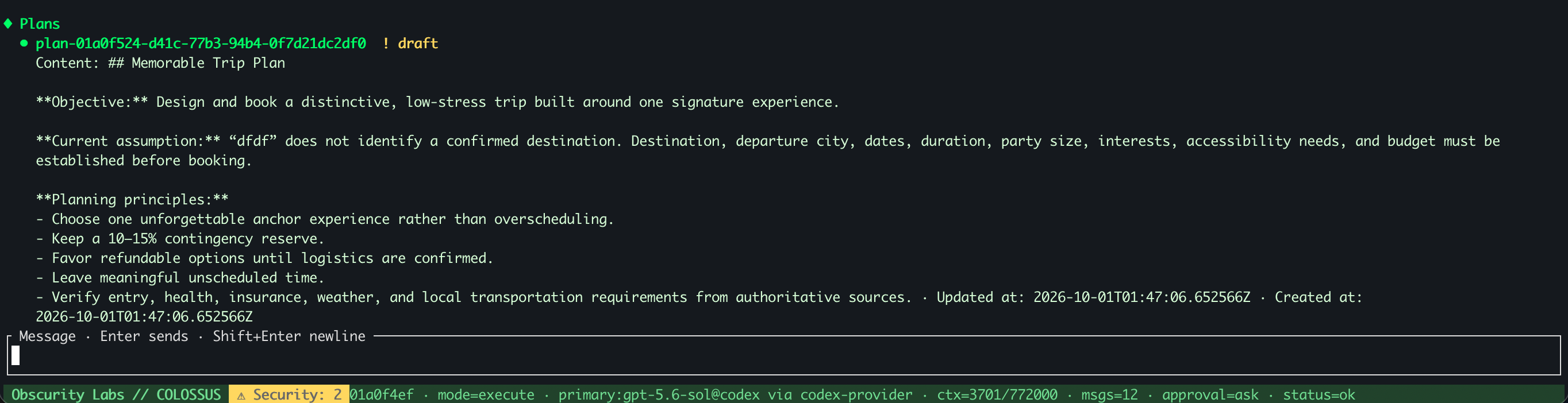
Open the full-size plans screenshot.
After restarting the TUI, Plan Mode and its selection reset. To work with an existing
Draft or Approved plan, select it again with /plan use PLAN_ID. An Approved plan
cannot be refined; create a new Draft if the approach needs to change.
If execution already created a Goal, inspect its status and remaining budget:
A cancelled or failed Goal remains Active. Resume it in the same session only when iterations remain:
Resume continues the existing goal and its remaining budget. It does not start a new plan or reset the iteration count. If the budget is exhausted or the Goal is complete or blocked, inspect the recorded result and decide on a new piece of work. When an external effect has an unknown outcome, inspect its evidence before attempting it again.
Plan from a shell command
For a noninteractive workflow, create a Draft in an existing session and inspect the saved plan before approving it:
colossus run --plan --session SESSION_ID \
  "Plan the repository change and its verification"
colossus plans list --session SESSION_ID
colossus plans show PLAN_ID
The CLI also provides plans approve PLAN_ID and run --execute-plan PLAN_ID; add
--goal --goal-max-iterations 12 to use the bounded Goal loop. A noninteractive run
may need an explicitly chosen approval mode for the approval and later effects. See
Tasks, decisions, and plans for the full record lifecycle
and TUI commands and keys for every interactive
command.
What's next?
-
Goals and subagents
Run a bounded goal without a plan or delegate independent work.
-
Sessions
Find the conversation and continue its work later.