Skills and plugins
A skill gives Colossus instructions for a particular kind of work. A plugin
packages skills and may also include resources or MCP server declarations. The CLI
includes the colossus plugin with coding, offline-dev, plugin-authoring, and
schedule-task, and security-review skills.
Choose a skill for one message
Type @ in the terminal composer to open the skill picker. Use Up/Down to choose
a qualified name and Tab to insert it. Then write your request and press
Enter:
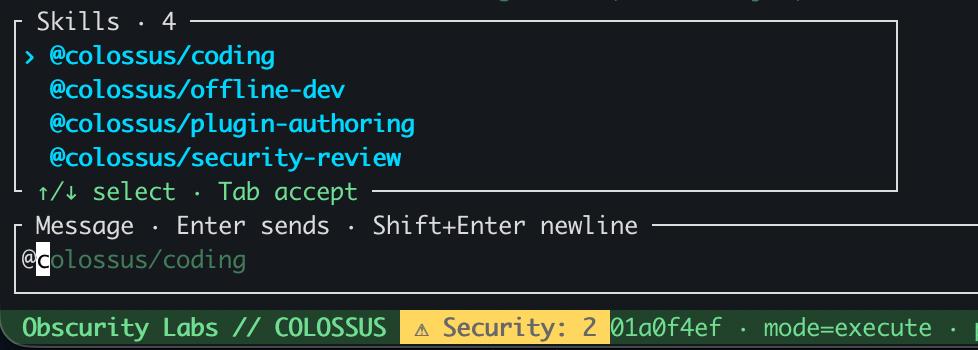
The selected skill applies to this message. The picker shows skills from plugins
available in the current workspace; type a qualified @PLUGIN/SKILL name directly
if you already know it. Open the full-size screenshot.
Keep a skill selected for the conversation
Use /plugin skills to see available qualified skills, then select one for later
messages in this conversation:
The sticky selection stays active until you remove it, clear all selections, or end
the conversation. You can still add a skill to a single message with @.
Use @colossus/schedule-task to create or control recurring tasks through the scheduling tools. See Workflows and schedules for prompts and timing behavior.
Use /plugin show colossus/coding to read the skill instructions. A plugin can offer
several skills; selecting its name in plugin inventory does not select them all.
Inspect plugins
Enter /plugins to see installed plugin candidates and their status. Use
/plugins show colossus for one plugin. A plugin must be enabled and available in
the workspace before its skills can be selected. Installing a plugin and enabling it
are separate operations.
Skills guide the agent's behavior; they do not add tool permissions or bypass approvals. An MCP server packaged with a plugin also needs its own explicit server enablement and tool selection. See MCP servers to inspect configured servers.
What's next?
-
Agent Plugins
Author, install, verify, and enable a plugin with its own skills and resources.
-
MCP servers
See which external tool servers are configured and discover their tools.